I have downloaded filezilla and it is asking for host username password and port. I can sort username and password but what host name and port should I input
If you are asking about the ftp connection to Galaxy Europe, then you can find all necessary info here: Galaxy Europe | FTP service instructions

Hi,
left panel shows your local files, right panel the server side. You are supposed to just drag files over.
Thank you, very helpful.
So I logged onto the platform.
Dragged one file (41.3GB) into ftp galaxy see attached.
I pressed start and it didn’t upload. My calculation is that it should have uploaded in approx 18mins.
The upload speed is 300mb/sec.
I don’t know what the problem is.
Please advise.
Thank you
Richard

Hi @richard64
Thanks for sharing the screenshot!
Did you resolve how to get the data loaded? Instructions are in the guide that @wm75 shared.
The FTP process happens in two steps.
Local computer → Server
- Load your files up to the server into your user FTP Directory. You can do this command line or with an FTP application like Filezilla.
- Connect to the target server using your existing account email address and password.
- Load the files into your account (not a history! This is your own transfer directory external to the history system).
- From where you are now in the screenshot, you seem connected to your account at the server. Next, drag files over from your computer (listed on the left side of your screenshot) over to your user directory on the server computer (listed on the right). Allow that process. This is where the data is moved up onto the server.
Server → Active History
- Go to the Upload tool, use the option Choose from repository, and select the newly loaded files from your own FTP Directory repository (the first item in the listing). This step sorts the data into your active history.
Screenshots for this second step


Please let us know how this goes! The first time can be a bit tricky, then you’ll be able to do this quickly after that. 

Hi @richard64
The job seems to be queued, which can be normal depending on how busy the server is. The 1% was the server confirming that the file is there (establishing that the connection is available). I would leave this queued so you don’t lose your placement! Restarting will put your job back at the end of the queue again, and done often enough the job may never get a chance to move up and process.
More about how the job queue works. → How to see the UseGalaxy.eu job queue statistics
Right now, it looks like there are 2k+ Upload job waiting to be assigned to a free cluster node, and another 120+ actually executing. (“DATA_FETCH” includes the Upload tool). So, the Upload jobs are definitely processing at the EU server, it is just very busy!

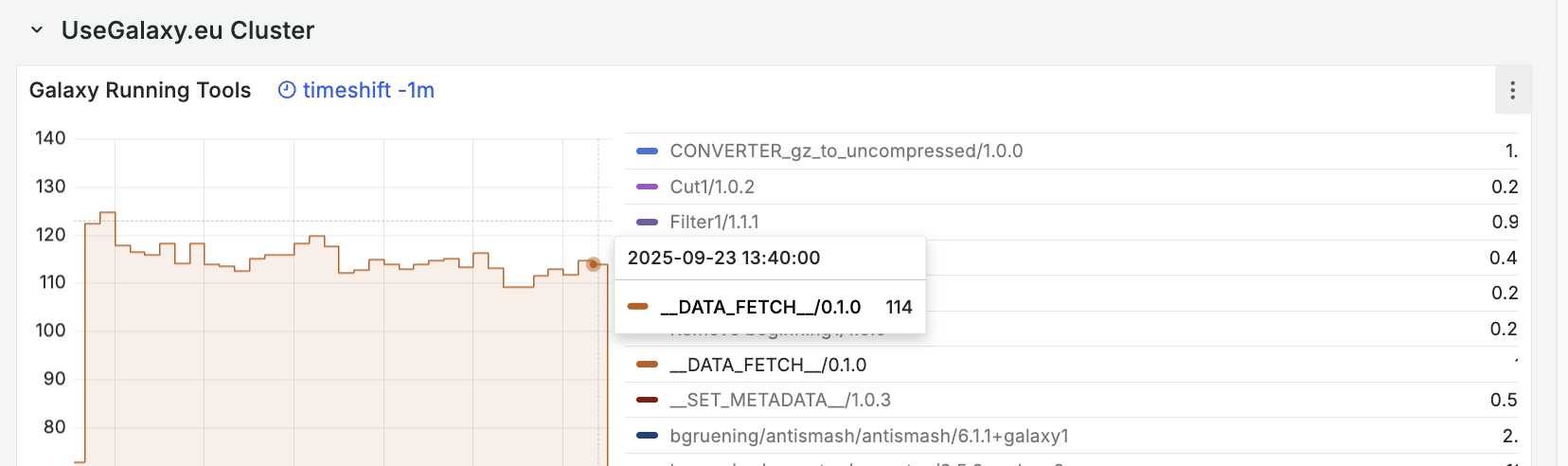
Your connection to Galaxy needs to stay active while queued and then later on when actually executing. But you can use the Close button the Upload tool window and do other things while this is working in the background. This topic has some screenshots that show how to see the progress in the side Activity bar. → Galaxy Collection Upload Not Working - #2 by jennaj
I hope this helps!
Thank you I will try again, but as there is a queuing system I will be uploading 2 x 41.6 GB.
You have explained that I need to keep my laptop active whilst queuing and of course while it files are uploading. Could you let me know how long I should make sure the laptop is active due to queuing and upload please? I guess it depends on how busy the system is, how can I assess the time period I would need to wait before successful upload?
Regards
Richard
On another point.
This is an attempt to upload 2 x 41.6 GB directly onto Galaxy, is that pk, I have also been advised these files are too big to upload directly and I should use filezilla.
Please advise
Richard Melzack
Hi @richard64
It is hard to predict how long this will take.
Your have shared screenshots from both methods so I am not sure which you are doing now? How is this going?
Hi
Just to clarify, it was recently explained to me that with large files it is best to use the ftp route, but I think you are saying that it doesn’t matter which way I chose to upload?
Regarding the time, are you suggesting I leave my laptop constantly active, even if that is overnight?
Regards
Hi @richard64
Yes, either should be fine. Leaving the source location of the data connected to Galaxy is important for either method.
Did you let this run yesterday? How is it going?
Hi
Thanks then I will use the direct Galaxy upload screen.
I will run it on Monday, do you have any advice when is the best time to upload when the queue might be shorter? Or maybe it would be better to upload during the weekend? In any event I will get in the queue and leave the laptop on constantly active.
Regards
Richard
Hi
I managed to set up and start the upload on early on Saturday and allowed it to run throughout the day, and even though my internet upload speed is close to 300mb/sec the uploading was very slow and in a number of hours it had reached around 70% and by midnight it had only got to 76%. Further it had somehow stopped uploading completely even though it was saying it was still uploading.
I am not sure how to proceed?
Regards
Richard
HI @richard64
Would you like to share the history where the data is installing (or was installing?). We can take a closer look at the progress. Try to leave it connected still. There is a resume function but it doesn’t seem like you need that yet.
Hi
I disconnected as nothing downloaded for hours so I guess I will have to start again. Can you explain why the system stopped downloading at 76% of the first of two 42 GB files?
When I run it again I can send you a screen shot of when it stops uploading. Will that help?
Thank you
Richard
Hi @richard64
It is hard to guess without seeing the exact job, so I don’t think a screenshot will help. Next time you try, maybe start it up and let it run overnight?
Hi
I have started the upload again and the speed hasn’t changed, it is still extremely slow speed. At this rate one 41GB file will take 1.5 to 2 days. Please could you let me know if that is normal.
The upload speed here is 250 to 300 mb/sec
Thanks
Richard