so I was using Galaxy SynBio CAD, for retrosynthesis, and i used RetroPath2.0 for it, now RetroPath2.0 is supposed to also provide us with a scope matrix, along with the csv, without that csv, i cannot visualize the pathways in RP2paths, and so my workflow is halted. It asks me for RetroPath2.0 's output as input, and yet always i get the error that scope matrix is not found, please if anyone knows help me out

Welcome @Swati_Kundu
Thanks for sharing all of the details! Let’s get your protocol working! First I’ll walk through some of the knowns.
This is the public Galaxy server
- Directory Galaxy-SynBioCAD - Galaxy Community Hub
- Server https://galaxy-synbiocad.org/
From the homepage, I used the first workflow in the examples listed with all of the default settings.
- Output history https://galaxy-synbiocad.org/u/jenx/h/retrosynthesis
- Link to workflow Galaxy | SynBioCAD → RetroPathways
- Video usage → https://www.youtube.com/watch?v=qbs8sC9mQs4
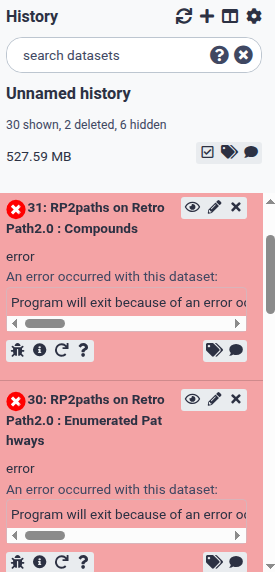
Note: My run failed due to not specifying any of the custom parameters. However, the files from one tool to another are still captured and will likely address the root issue of missing outputs from one tool to another?
Details: outputs to select from RetroPath2.0 into the RP2paths tool are described in the workflow here:

If you inspect the example workflow and history, does it help?
I noticed that the tools have newer default versions and that may be a complicating factor when working through the processing. Using the same versions as in the tutorial workflow may help? Tools evolve over time but you can usually access all versions that were originally hosted. This can be important, especially when following a known protocol tutorial that includes specific instructions. Note: if you open a GTN tutorial directly inside of Galaxy (using the  icon), you’ll be able to click on a tool to open that same version, which can sometimes help!
Workflows are anchored in specific tool versions too! This means that once invoked, the workflow will choose to use the same version as when original contrusted.
Finally, if you think these workflows have a problem, reaching out to the scientists that developed them is probably best! The contact email is included on the server page here:
- Directory Galaxy-SynBioCAD - Galaxy Community Hub
You can share a link to this topic for context! I also sent in a bug report from my error (in the history above) with a link to this topic to invite them to provide feedback. Maybe they will update the community about the root issue if it will impact more people. If you would like to generate a share link to your history and post it back, that would help with troubleshooting more here, if you would like us to double check the tool versions for you, or to try to interpret the full error based on the job logs.
- How to generate the share link and where to find the logs → How to get faster help with your question
Let’s start there and please let us know when you are able to solve this! 
Thank you so so much! I was stuck at that stage for so long, it worked when I changed the RetroPath2.0 tool version to older versions. Super grateful!
Nice, I’m glad this worked out @Swati_Kundu! Thanks for letting the community here know. 